We’re building a site to host a few hundred videos. We are using the SearchSolr module for indexing our items. We have subtitle files for the videos, as well as transcripts without time markers. To display the videos we either need to embed a streaming service, or serve them from our Omeka server (they require quite low bandwidth). We might use the Transcript module for this.
What are the options for loading the transcripts or subtitles into Omeka so that the full text can be searched? I was looking at the Extract Text module as that is doing something similar. To experiment I tried editing an item and adding some text to the extracttext:extracted_text property but when I saved the value disappeared from the item. I’m not sure whether the SearchSolr module would pick it up anyway.
We don’t need to display the text, unless of course there was a clever way of providing a little excerpt showing the match!
1 Like
Some further thoughts:
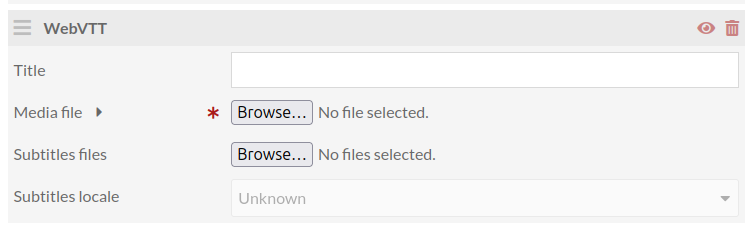
The Transcript module handles subtitle files in a way I did not expect. You can upload a video in the Media tab when editing an item, using the WebVTT option provided by the module:
The “media file” (i.e. the video itself) gets added to the item as a media object with the ingester and renderer both set to “webvtt”. The subtitles file (a .vtt file) unexpectedly is stored in the global
asset folder, and the media object links to it. When I examine the media object JSON via the API, after the standard “o:” fields there is a little section called “data”:
...
    "o:original_url": "https://xxxx.durham.ac.uk/omeka-s/files/original/2bd0ae402dcfc77f22bf419adede1219507d5b97.mp4",
    "o:thumbnail_urls": [],
    "data": {
        "texttracks": [
            {
                "storage": "asset/fb7a66b1768d476a3fd41011309cde880a080254.vtt",
                "language": "en"
            }
        ]
    }
I think it would be better, architecturally, if the subtitle file was stored as another media object on the parent item, with linkage between them expressed using appropriate metadata fields. But I can see that the approach adopted in this module helps to make sure the user cannot muck things up by editing the various bits independently. Although the subtitles are stored in the “files/asset” folder, they are not visible when you go into the Assets section of the admin interface.
The only other Omeka S module I have spotted which handles a video and its transcript nicely is the OHMS Embed module. The sample OHMS files available from their website only have a series of “points” marking key sections of an interview, and a single big transcript field without any timings in it. I see from the schema though that you can have a vtt_transcript field. So perhaps this is worth exploring.
Are there any live Omeka S sites out there using the OHMS Embed module, and preferably with timed subtitles? I’ve only found Omeka Classic sites so far.
OHMS has two ways of doing timing in the transcript. The older way uses “sync” data carried in the XML to associate a regular interval of timestamps with lines of the transcript (this is separate from the chapters/sections that can also link to specific times).
The newer way uses a WebVTT transcript, as you saw. The WebVTT support in the OhmsEmbed plugin will present linking timestamps for every line in the transcript.
I’m not a good source for who’s using it in the world, though.
Thank you for confirming the features. Using one of the sample OHMS XML files I created my own XML file with a vtt_transcript section. I loaded the MP4 file as a media object attached to an item, and then I copied the original file URL from the Omeka admin interface into my XML file, in the media_url tag, so that section of the file looks like:
    <media_id></media_id>
    <media_url>https://caxton-test.durham.ac.uk/omeka-s/files/original/f41bd09fb71366ab00add80d2793d4475869ef8f.mp4</media_url>
    <mediafile>
      <host>Host</host>
      <host_account_id></host_account_id>
      <host_player_id></host_player_id>
      <host_clip_id></host_clip_id>
      <clip_format>video</clip_format>
    </mediafile>
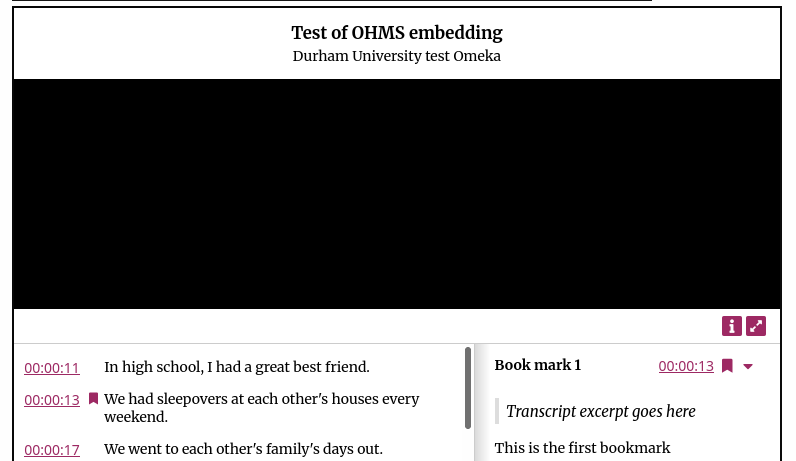
After uploading the XML file as a second media object attached to the same item, the OHMS viewer appears nicely in the item display, with the VTT timings shown as a list with links. I created a “point” at 13 seconds in, and that displays too.
The only thing that isn’t working is that the video does not play. All I get is a black box and no play tool. The video does not play if you click on the timings either. I’m thinking that I’ve probably got something wrong in the OHMS file, which is why it would be really useful to see some working examples!
(I didn’t create the OHMS file using the online tool as something went wrong when creating the account.)
“host” is actually important to the OHMS setup as much of its support is for external embedded videos from youtube, vimeo, etc.
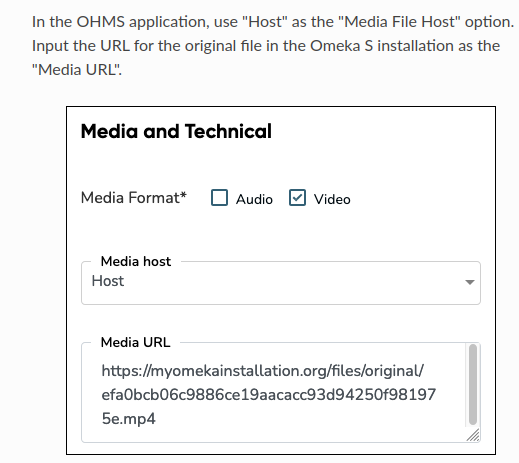
The <host> tag should be other for a direct link to a video file.
Thanks - got it working now! I had been misled by this section of the manual. But of course, if you use the OHMS editor and choose “Host” it could quite easily put a different value in the XML.
I now understand that the extracted_text value stored on the Item object is built from those stored on the various attached Media objects. So it’s possible to add extract text manually using the admin interface by editing a Media object, and it will then appear and be indexed on the item. We will probably want to hide the extracted text from view using the Hide properties module.
1 Like