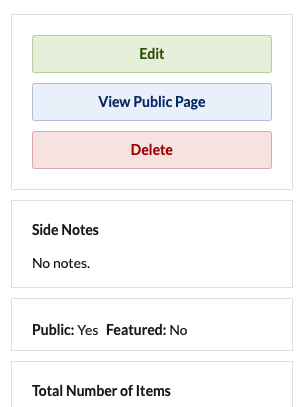
I’ve just released a small admin-side plugin called SideNotesPlugin that lets you attach private internal notes to Items and Collections directly within the Omeka admin interface. It stores notes in their own database table and adds a “Side Notes” panel right on the edit screen—no core hacks required.
Features
Add, edit, or delete per-record notes visible only to admin users
Seamless integration into the Items/Collections edit panels
Uses a single database table with an upsert query to avoid duplicate-key errors
Lightweight: no extra dependencies
You can grab the code, installation instructions, and screenshots on GitHub:
Haven’t tried it yet, but if not already existing I’d like to suggest adding a page (accessible via the admin main side menu) to list all items/collections with side notes, so that it’d be easier for the admins to find them (that would open a Pandoras’ box: you could for instance use an extra table to check whether a particular admin has seen a particular note, if not then highlight it somehow).
Hi. I’ve tried installing it on Omeka 3.1.2, and it seems to be working fine.
I would make some slight graphic changes:
no need for “Browse Notes” title above the tabs, since it’s already the title of the page (so, it’s a repetition);
the “Delete” link is styled as a button, but then the button’s border and background color are hidden, so it results in a odd padded-link; I’d just keep the link, no need for the button
“note preview” could be quite a long text, you might want to make sure it’s cropped in that case
in Item and Collection Edit mode, I’d change the title to “Side Note” and then move the text “Internal note (visible only to site staff)” into the text area, as a placeholder, thus reducing the space taken
Also: you might want to create a new release on GitHub, so everyone that had installed the previous version will receive a notification that a new release is available.