I love the “Search by Metadata” plugin.
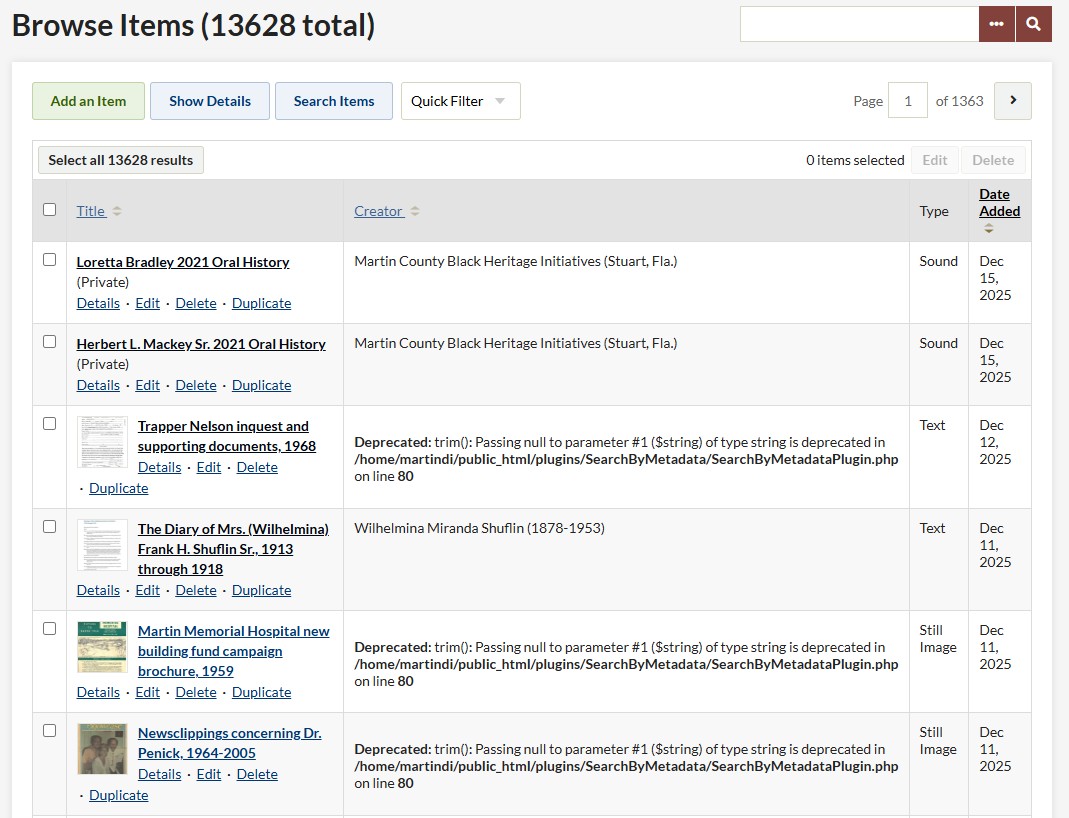
However, when I do to the “Browse items” page in the Dashboard interface, the table featuring the latest additions shows an error message for all records that have an empty creator field, which I have made a hot-link in the plugin.
To elaborate, when I’m in the Dashboard page then click Browse items, then there’s a table of records with Title, Creator, Type and Date added. If the Creator field (the only hot one of these) is blank, I see “Deprecated: trim(): Passing null to parameter #1 ($string) of type string is deprecated in /home/martindi/public_html/plugins/SearchByMetadata/SearchByMetadataPlugin.php on line 80”
It doesn’t show on the public view. I’m using the Foundation theme.
Any way I can get the empty fields to not give this plugin a fit?
You must have some situation where there’s a “value” for Creator in the database for these items, but it’s null… that’s not the typical situation, usually there just is no value there at all. If you edit and re-save one of these items while making no changes, does that do anything to the message?
Anyway, we should be able to fix this in the plugin itself without much trouble.
Thanks for responding… I opened one of the files displaying the deprecated message and saved it, but there was no change on the display.
In SearchByMetadataPlugin.php, line 80 is:
if (trim($text) == ‘’ || !$elementText) return $text;
I’m assuming there’s a mistake there?
Yeah, so the simplest fix (and probably what we’ll do) is to change that line to:
if (trim((string) $text) == '' || !$elementText) return $text;
The new version 1.2.3 (available on the addons list) should fix this problem.