Hello,
In our Browse page, the sort option is default as “Descending”. Is there a way for us to change it to “Ascending” instead?
I have tried to change the Sort option in “Site admin” → “Settings” → “Browse” → “Item browse defaults” but they only change the sort option in the search result page and not the Browse page itself.
Thanks,
Lu.

The setting should affect the browse page.
I see those “A,” “B,” etc. links on the left which don’t look like the normal browse page. Do you have a module that’s providing its own browse page maybe?
Hello John,
Those “A”, “B” etc. links are Faceted Browse links that I created. I just noticed that I’m currently on Faceted Browse 1.3 so I will update the module to see if the sort option will affect the sort option in the screenshot.
Hello John,
Updated Faceted Browse to 1.5.1 version but the default sort option doesn’t change after I saved. Is this a known issue or something on our end prevents it to change?

I have not heard of this issue, and I cannot reproduce it. It correctly switches to “Ascending” when set. What version of Omeka S are you using?
Omeka S is 4.0.2 version
We fixed some bugs related to sorting in more recent versions. Try upgrading Omeka S to 4.1.1 and see if that fixes the issue.
1 Like
Hello,
we recently just upgraded the Omeka S to 4.1.1 version and the issue is still there.
To be clear, setting the default sort order to “Ascending” doesn’t stick? And does this happen with every category, or just this specific one?
I still can’t reproduce. I see that you have “Name start” as your default sort by. This is a custom column, correct? It doesn’t come with the module. Perhaps that column is somehow causing this bug, but I’m not sure how that could be.
Try creating another category with no facets or columns. Does that sort order stick?
Hello,
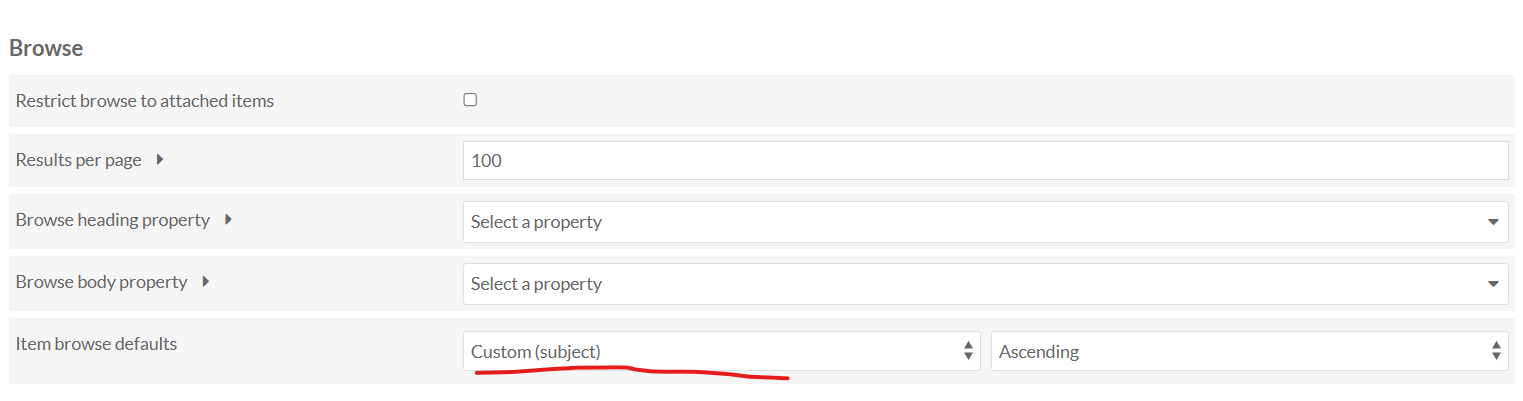
I initially set up the item browse defaulted by Custom “Identifier”.
The initial page load does load the correct items

but if the user select a different item on the dropdown menu, the Custom “Identifier” is no longer on the dropdown menu.
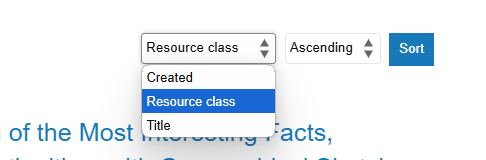
Sorry if i’m being confusing but I’m including all the screenshots step-by-step
Thanks,
Lu.
Can you tell us what theme you’re using, and what version of it you’re using?
The theme is Foundation and the version is 1.4.1
Edit: I updated the version to 1.5.3 and the issue is still there
Hmm, we can’t confirm that issue… doesn’t seem to be a problem when using that theme, it should be maintaining the custom option when you’ve picked something else.
This topic was automatically closed 360 days after the last reply. New replies are no longer allowed.