Hi Everyone - I’ve really appreciated all of the modules, themes, and tips that have been shared in the Omeka community - they’ve really helped create a solid website for our volunteer group at https://archives.portolavalley.net. Now it’s time to give back.
I’ve just released Accessibility Plus, a module for Omeka S 4.x that gives admins a “plug and play” way to make a site easier to read for a frequently overlooked group of visitors.
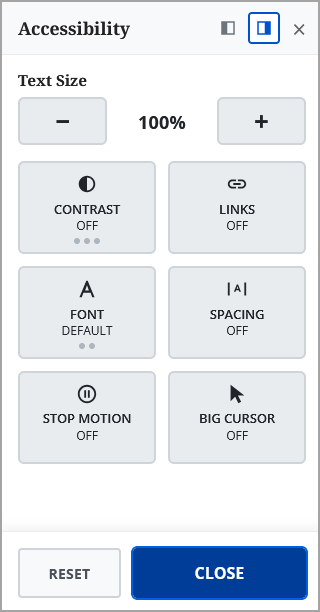
The module adds a small floating button on every public page to open a panel where each visitor can:
- enlarge the text (up to 200%)
- switch to high contrast, inverted colors or grayscale
- highlight links
- change to a readable font (Atkinson Hyperlegible) or a dyslexia-friendly font (OpenDyslexic)
- widen line, letter and word spacing
- stop animations and other moving content
- enlarge the mouse pointer
Their choices are remembered in their browser and applied on every page. There are no cookies or tracking, and the fonts are included, so nothing loads from other websites.
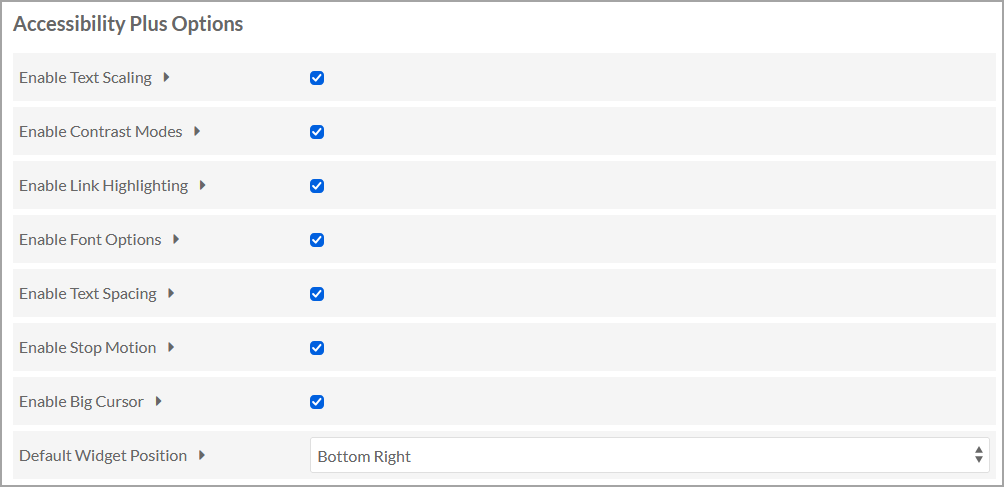
Setup is minimal: install it and the button appears straight away. No theme changes are needed. Each site can choose which tools to offer under Site admin > Settings. Theme developers can fine-tune things with CSS classes and a JavaScript event (details in the README).
It’s translated into all 31 languages Omeka S ships with. The translations are machine-generated, so if you’re a native speaker and something reads oddly, I’d be glad of a correction.
It’s only one piece of the accessibility puzzle, not a substitute for an accessible theme and content, but it helps visitors who need a bit more control. I’ve registered to add it on Omeka’s Module page, but you can always find it here:
- Download: Release Accessibility Plus 1.0.0 · CL0099/AccessibilityPlus · GitHub (use the
AccessibilityPlus-1.0.0.zipfile) - README, screenshots and documentation: GitHub - CL0099/AccessibilityPlus: Omeka S 4.x module: Visitor reading and display preferences widget (text size, contrast, readable/dyslexia fonts, spacing, stop motion, big cursor) · GitHub
- Bug reports and suggestions: Issues · CL0099/AccessibilityPlus · GitHub
It’s maintained by one volunteer, so support is best effort, but bug reports and suggestions are welcome on GitHub. I hope it’s useful!
Cliff