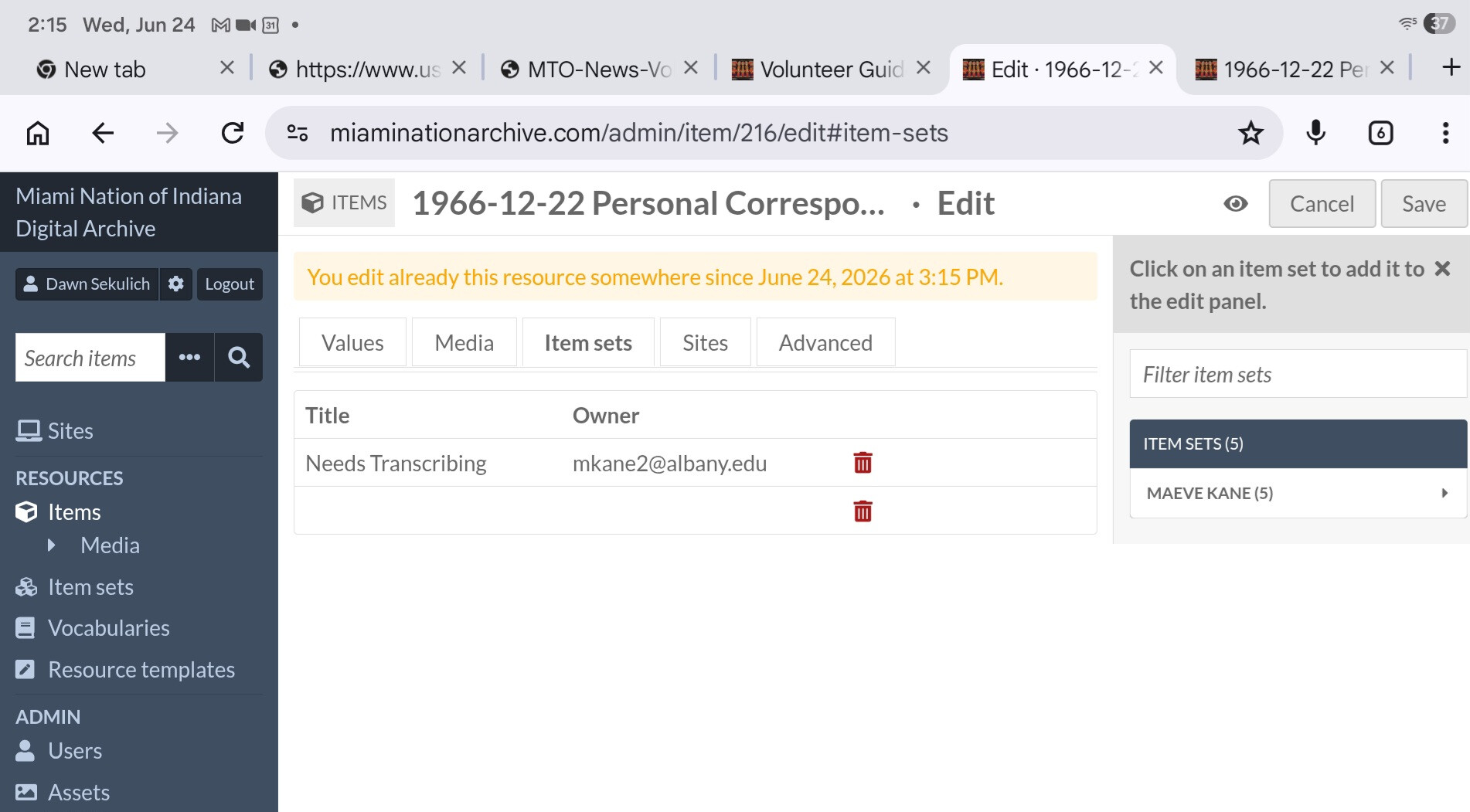
I have a user trying to edit an item that is in multiple item sets. In Edit > Item Sets, the multiple item sets show up fine for users on laptops, but the user with display problems is on an ipad with safari corrected: Galaxy tablet on Chrome.
When an item has multiple itemsets, the tablet user will see fields and icons for all the relevant itemsets, but only the first itemset in the list will have text. As part of our workflow, reviewer users need to add and remove itemsets, so this creates a problem where the tablet user can’t see the text for the itemset they need to remove.
Is this a known issue/is there something I can do on the admin side to get the itemset list to display? The user is working on getting a different device to work on, but our volunteer pool is from a low-resource community and sometimes device availability is limited.
What version of Omeka S are you using? And if you can get it, what version of iOS/Safari? If you can get a screenshot of the problem that would also help.
The second line should be another item set “Needs Cataloging”, same owner. When the user clicks the trash can on the blank line, it does remove the item from the item set.
We’re running Omeka S 4.2.0. We’ve had some conflicts with plugins in the past that have caused problems, I can post the list or turn some off if it seems like a possibility. Module confict wasn’t my first thought since other users can see all the itemsets in the list fine.
It’s possible this could be something caused by a module, but as you say it’s odd that would manifest as something only one user would see. Still that might be worth investigating. You could also narrow things down a little bit: if you add more sets, is it always the last one that’s blank, or all except the first one, or always this specific set?
Normally I’d also suggest looking at the browser console to see if that shows any errors or messages, but that’s a little more of an involved process on a mobile device.
When an item has more than two item sets, the user can always see the first item set, but none of the others.
I’m wondering if it’s some kind of glitch with user roles, because she tried logging in on a PC with Chrome and still couldn’t see more than the first item set. The user with an issue is a Reviewer. Two other Reviewer users with Firefox on Mac and Chrome on PC are also having the same issue.
With both a Supervisor and a Reviewer account on Firefox on Mac and Chrome on PC I’m not able to reproduce.