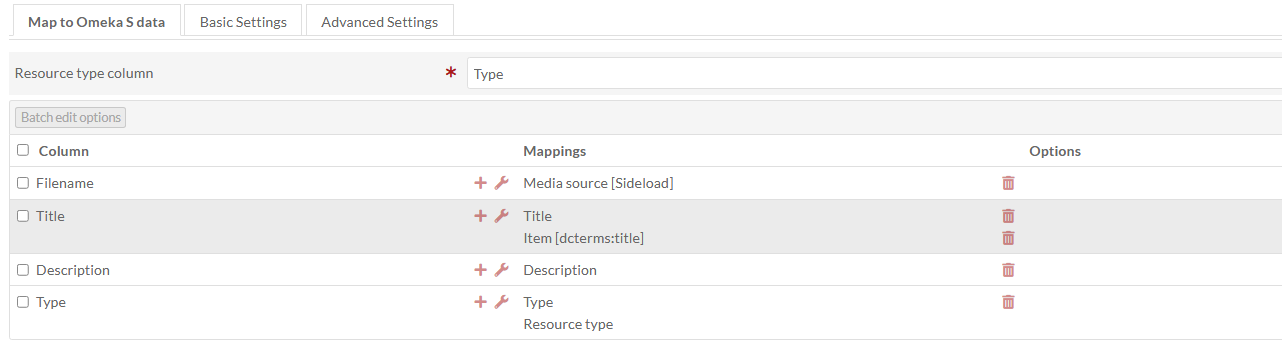
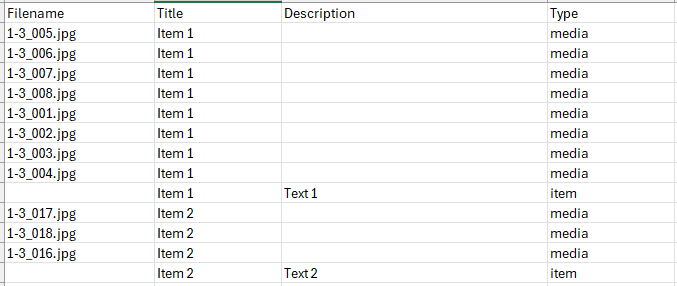
I’ve been trying to work out the best way to use CSV import to create items and attach multiple image files to them via sideload. When creating items that only contain one image I have no issues, but I’ve struggled with items that require multiple files to be attached.
I was able to create a CSV and mapping that would create the items and pull in the multiple image files using a mixed resource import and setting dcterms:title to media-specific data. However I later noticed that all the files pulled into my items in this way are failing to load into a IIIF manifest when published. A secondary problem I noticed was mapping to title overrides my original filenames in the item viewer, and this would be useful to retain for cross checks and searchability between my different systems/storage locations.
I’ve experimented with mapping to different identifiers (dcterms:identifier etc) but received ‘invalid identifier’ errors in each instance other than Title.
If anyone has any insight on these issues I’d be very appreciative! I’ve gotten to this stage through trial, error and checking documentation but there’s definitely gaps in my working knowledge around how the module works. I’m sharing screenshots of a dummy CSV and mapping that represents a minimal version of the work I typically plan to do with the module.
The simplest is to use the regular item import and enable the multivalue separator for the column you map as the media source. If you don’t need to set other metadata on the media, this is probably the way to go.
The way you’re doing here, a mixed resource import, will also work, but is a little more complex to set up. The keys there are, 1: you want to create the item first, and 2: whatever value you’re using to map the media to the item needs to uniquely identify the item. The problem you’re having of having unwanted “Item 1” titles set on the media can be solved by splitting up your title column: the one that’s mapped as Title, only fill that in for the items. Then have another that’s mapped only as “Item [dcterms:title]” that references the item’s title and only fill that one in for the media. That will let you link up the media using the item’s title without actually setting a title on the media.
Thanks very much for your reply. My initial instinct had been to use a multivalue separator in the media column, butthis whole time I hadn’t noticed it needed to be manually enabled within the field settings and was not a default action. Hopefully future readers will learn from my oversight! Sinple is best.