Is it possible to have the Lively theme header only appear on the homepage? We like the design but it’s too large to have on every page.
Thanks,
Nicole
Is it possible to have the Lively theme header only appear on the homepage? We like the design but it’s too large to have on every page.
Thanks,
Nicole
I managed this in CSS, which is probably not the best way to do it. But if you have the CSS Editor module, include this code snippet. It works for me.
body {
     div.main-banner.has-text {
          display: none
     }
}

body.page.site-page-home.user-bar {
     div.main-banner.has-text {
           display: flex
     }
}
Wow! Thank you so much!
So, that definitely removed the banner, but unfortunately from every page including the home page. Really appreciate you getting me close. I’ll have to work through this some more.
Were you able to find a solution? I just came to post the exact same question!
What version of Omeka are you on? And do you want to do this on multiple sites or just one?
An alternative to the CSS hack above, if you are on v4 and wanting this for a single site, could be to use the class that is on the body element for the front page. For instance, in one of our sites, the slug for the front page is introduction. So there’s a class on body named site-page-introduction. This class name pattern is the same on other site pages and can be used to construct CSS like this
body:not(.site-page-introduction) .main-header {
    display: none;
}
Since I haven’t used Lively, I’m not 100% certain about this, in particular that .main-header class as part of the rule. But it looks like from the GitHub repo that should be the class on what it sounds like you are trying to suppress. Are you able to share your site? I could be more certain/precise if I could see it.
For now, the way to achieve it is with CSS.
As mentioned above, depending on the slug for the front page, you can target this page only by using it’s body class and display the banner there only.
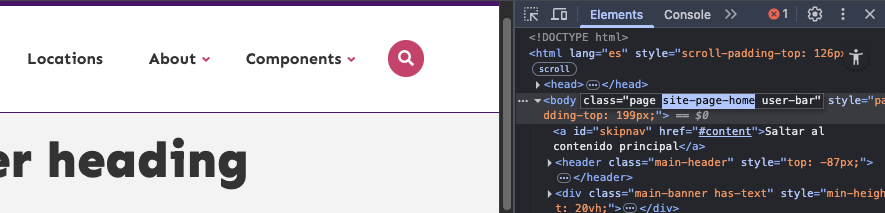
For instance, my front page slug is home, so the body in this page has a class site-page-home (you can confirm your own slug by checking the body tag in the browser inspector):
As slugs are unique per page, you can set the main-banner hidden by default, except for the page(s) where you want to display it, like this:
body:not(.site-page-home) .main-banner {
    display: none;
}
Please let me know if it worked for you.
Perfect! You’re a hero. That worked - thank you so much!
I didn’t see the updates on this thread until now. Anyway I tried this on my site and it works for me as well. Cleaner code than what I came up with. Thank you!
Hello all,
New Omeka S person, just finished the training last Fall. I am using themes Cozy and Freedom, which also have banners.
Just FYI, if you modify the css slightly by changing attribute .main-banner to .banner, the banner shows only on the home page for both these themes. The slug of my home page is /welcome.
Cheers!
body:not(.site-page-welcome) .banner {
display: none;
}