Hello,
This is a screenshot of the top portion of my Item Set page. I have a Hierarchy block in the left sidebar. It seems like this should be on the left side of the page next to the displayed items, like how it displays on the Item page, but on Items Set it is putting it up in the section above the items. Right now the Hierarchy section is short, but if I add much to the Hierarchy it is going to get absurdly long and push the Items down so people don’t realize they’re there. Is there a way to fix this? I’m using Freedom theme. Thanks!

Hey @sarahlynne,
This might not be of full use to you, but we a ran into a similar issue with the Hierarchy module but using the foundation theme. What we discovered is that the Item-Set page has the different blocks (left, middle, right, full), but irrespective of that, it puts the actual listing of the items - below those blocks. So it did not matter if we put the hierarchy module on the left, the items would only appear at the bottom.
We saw that the reason why this was happening was in the theme folder in the file view ->omeka->site->item->browse.phtml
        <div class="grid-x grid-margin-x">
            <?php if ($leftSidebarHasBlocks): ?>
            <div class="left-sidebar cell medium-<?php echo $sidebarWidth; ?>">
                <?php echo $leftSidebarBlockContent->getBlocks(); ?>
            </div>
            <?php endif; ?>

            <?php if ($mainWithSidebarHasBlocks): ?>
            <div class="main-with-sidebar cell medium-8">
                <?php echo $mainWithSidebarBlockContent->getBlocks(); ?>
            </div>
            <?php endif; ?>

            <?php if ($rightSidebarHasBlocks): ?>
            <div class="right-sidebar cell medium-<?php echo $sidebarWidth; ?>">
                <?php echo $rightSidebarBlockContent->getBlocks(); ?>
            </div>
            <?php endif; ?>
        </div>
        <?php endif; ?>
    </div>

    <div class="item-set-items">
    <?php echo '<h3>' . $escape($translate('Items')) . '</h3>'; ?>
<?php else: ?>
    <?php echo $this->pageTitle($translate('Items'), 2); ?>
<?php endif; ?>
It seems like it shows all the blocks and then only displays the items. So we ended up customizing the foundation theme, and rewriting the file for view ->omeka->site->item->browse.phtml to force the <div class="item-set-items"> to sit under the <div class="main-with-sidebar cell medium-8">.
Perhaps you can follow the same approach, I can send you the whole file but it might not suit your theme. Sadly I can’t show you a screen shot here because it is a PhD student site that is still under examination…
Hope this helps somewhat,
Sanjin
Hi @sarahlynne and @sanjinmuftic ,
I think the answer to both your issues lies in the respective theme’s Configure Resource Pages interface, which can be a bit tricky to find if you don’t know where it is.
On your site’s Theme selection page, each theme should have two buttons beneath its description–Edit Theme Settings and Configure Resource Pages. If you click Configure Resource Pages you will get a page with tabs for Item page, Media page, and Item Set page, and here is where you can drag and drop to set the region where block content will appear–Left Sidebar, Main, or Right Sidebar.
I believe by default that Hierarchy content will appear in the Main region, but I just tested with both Freedom and Foundation themes and was able to move Hierarchy to the left sidebar as desired.
Please let me know if this still doesn’t solve the issue and I can investigate further. Thanks!
Hi Matthew,
I’m not sure you followed what my issue is. I can move the hierarchy block around as you said in the edit resource page, but it appears in the section above the list/grid of items, and I need to have it next to the the listing/grid. The hierarchy in my screenshot is short right now because I just installed hierarchy, but as I add more to it that list will get very long and people who come to the page will have to scroll a lot to even see there are items there on the page under the hierarchy. Hierarchy needs to be to the left or right of the list/grid of items, like a typical website page navigation frame would be. There isn’t an easy way for me to do that, so I would need direction on how to accomplish it by editing config files (which one?), or CSS if possible. Hope that makes sense. Thank you.
Hi Sarah,
I think I understand the issue, but I’m surprised the Configure Resource Page Item Set tab isn’t working–when I have mine set like so for the Freedom theme, it’s aligning the Hierarchy block in the Left Column Region with the item listing in the Center Region :
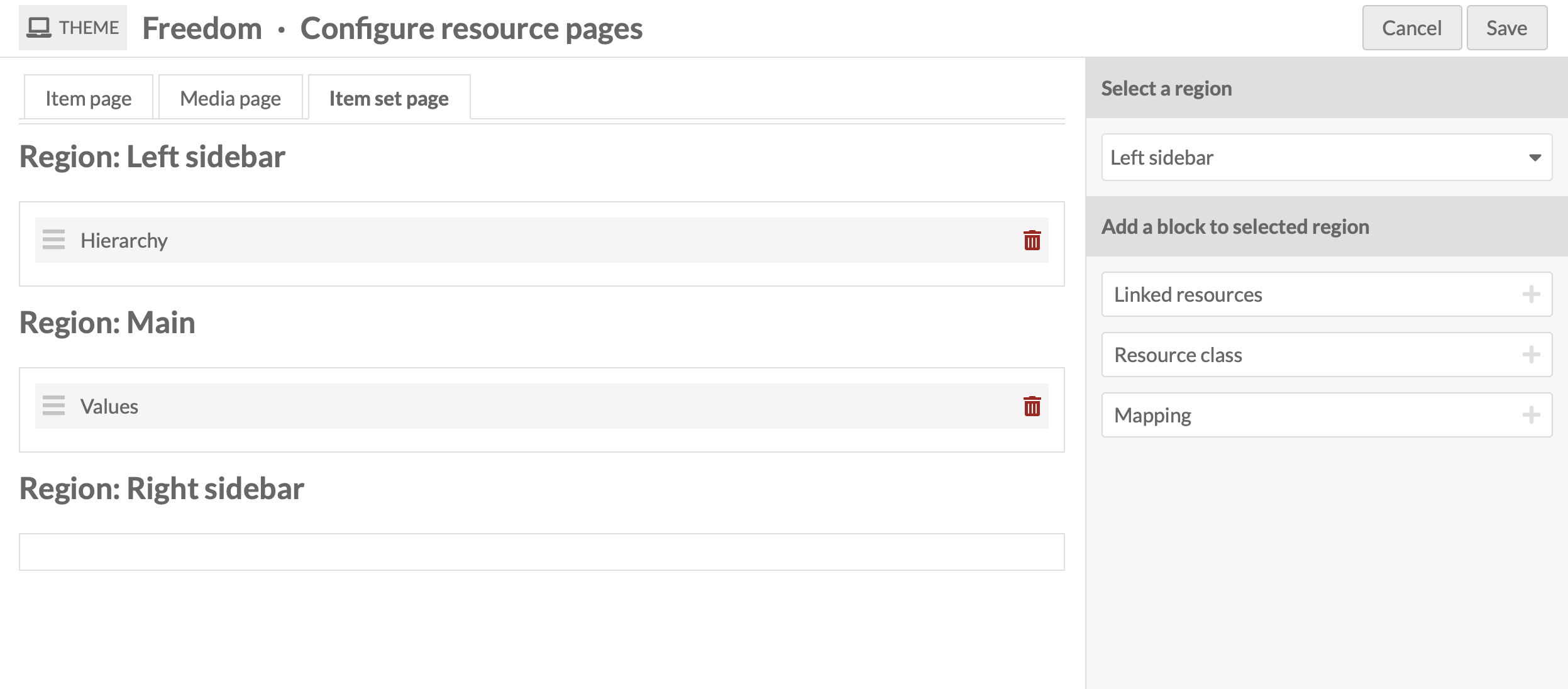
If your page looks like mine above and the problem persists, and you’re using the latest stable versions of the theme and Omeka S, then it is indeed a bug. I’ll go ahead and loop in @nelsonamaya who is the designer of the theme to look into a fix.
1 Like
That’s odd! I’m using Freedom version 1.0.7 and Omeka S version 4.2.0. I’ve made sure to configure my item set page exactly as you and here is my result. It still puts hierarchy above the region with the items. It would be great if it’s just a bug that can be fixed. Thank you. 


It might be helpful to know what other modules you have active on your install.
—sml
Ah OK my mistake, I was looking at the Hierarchy grouping page for the item set instead of the item set page itself. My item set page on Freedom indeed looks just like your second public page screenshot, with both regions set above the Items display.
So yes, this is not a bug but a feature of the Freedom theme page layout. The code controlling this behavior is in the file Sanjin shared above, themes/Freedom/view/omeka/site/item/browse.phtml
Unfortunately I don’t see a simple way to move the Items display into the Main region in that file, since they are wrapped in some if/else conditionals. It’s certainly possible but will involve some more detailed restructuring of the code.
@nelsonamaya , do you have any ideas here? Alternately, would it make any sense to have the Item Browse be its own configurable block within the theme Configure Resource Pages interface, so it could be placed within the main region by the user instead of automatically showing below the grid?
1 Like
@sarahlynne @Matthew @sharonmleon I’ve been looking into this issue and found that it’s not a Freedom theme issue, but rather the default layout from Omeka S core (we don’t override the Item Set page template in Freedom).
As @sanjinmuftic mentioned above, the Item Set page works differently because it not only displays the Item Set metadata, but also the items that belong to it. By default, the layout for both Item and Item Set pages is the same:
Sidebar region | Main region
We normally render the Item / Item Set metadata in the Main region.
The difference is that the Item Set page also needs to render its items, so those are displayed below the Sidebar | Main layout.
Here’s a more detailed example of how this works for both resource types:
Items:

Item Sets:

We’re not currently planning to override this template, so the theme will continue using the default Item Set template from Omeka S core. However, you could follow @sarahlynne’s approach to override it if needed.