Long post incoming, apologies… We’ve used the Knightlab Timeline on several projects (which is so nice to have available via a Module - thank you, thank you, @Daniel_KM!) and are hoping to use it for more.
Knightlab’s Timeline, though, has a ton of elements with color contrast ratios that don’t meet WCAG 2.1 specifications when used as-is. I’ve been remediating the color contrast issues by adding CSS to override Knightlab’s CSS, but it’d be nice to have the timeline be accessible out-of-the-box and not require all this extra code.
This apparently came up in Knightlab’s GitHub issues years ago; turns out Knightlab created a theme called “contrast” that I think would fix most of these problems. I can’t figure out how to implement that with the Module, though, since their instructions are to add &theme=contrast to the iframe source URL, and I don’t see one for the Knightlab timeline in the Module. Any ideas? I can post in the module repo but I thought I’d ask here, too, since this Knightlab timeliseems to be a popular timeline generator with Omeka S folks.
I should mention that before our team knew about the Knightlab “contrast” theme, I wrote a bunch of CSS to override their default colors—if that’s easier than using a different theme, I’d be up for sharing that CSS with others.
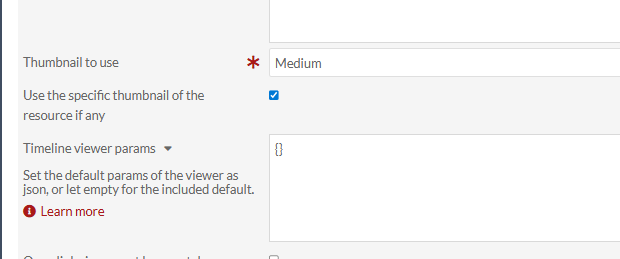
In the Timeline blocks when you build the page, there is a place to enter:
{theme: ‘contrast’}
In one block, it is called “Timeline viewer params”:
In the other block type, it is called “Options”:
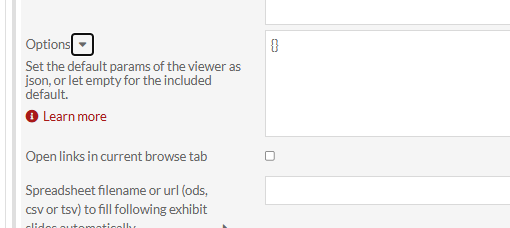
The only issue was it initially made the timeline headlines orange, so I used CSS editor to override that.
1 Like
Sorry, I should have also noted that this works for the Timeline blocks, but not for the timeline feature on the Mapping blocks. I don’t see a place in the Mapping blocks to add options.
There is a chance you could edit the mapping block templates to include the option text, or the owner of the Mapping module could copy over the “Options” code from the Timeline module.
1 Like
Hi,
Note that in the module Timeline (not Mapping), there are two libraries that can be used : Simile (default) or Knightlab. In the block, it can be switched with the icon template at the top of the block. The options are not the same for the two libraries.
Anyway, the point is a style question, so you can modify css inside the theme or via css editor.
2 Likes