Hello,
We wanted to ask the community about how they might be dealing with bot traffic on their sites. Specifically if the traffic is affected by search/find pages. On our institutional showcase site, we have an issue at least once a month where a swarm of bot traffic can bring the site to a crawl. While we work with our IT team to try to limit it , we also noticed that a lot of the traffic centers around the different sites’ /find pages (around 50 of them, for example: Search · Ernst Westphal Collection (Centre for African Language Diversity) · Ibali). We wonder if there is something in the set up of the find pages that is allowing the avalanche to form. We frequently get the SQL- Too many connection error and are logs are full of items being accessed which don’t exist. It would just be interesting if there might be a configuration change that we could add that stops the bots from crawling down the search function of random content/string that they try and make up. Happy to share the config of our search if it will help.
We don’t have SOLR, we just have Advanced Search version 3.4.54. And we have one Internal[sql] adapter.
Thank you,
Sanjin
1 Like
Hi Sanjin, I recently faced the same problem with aggressive AI bots, the worst of all was ClaudeBot.
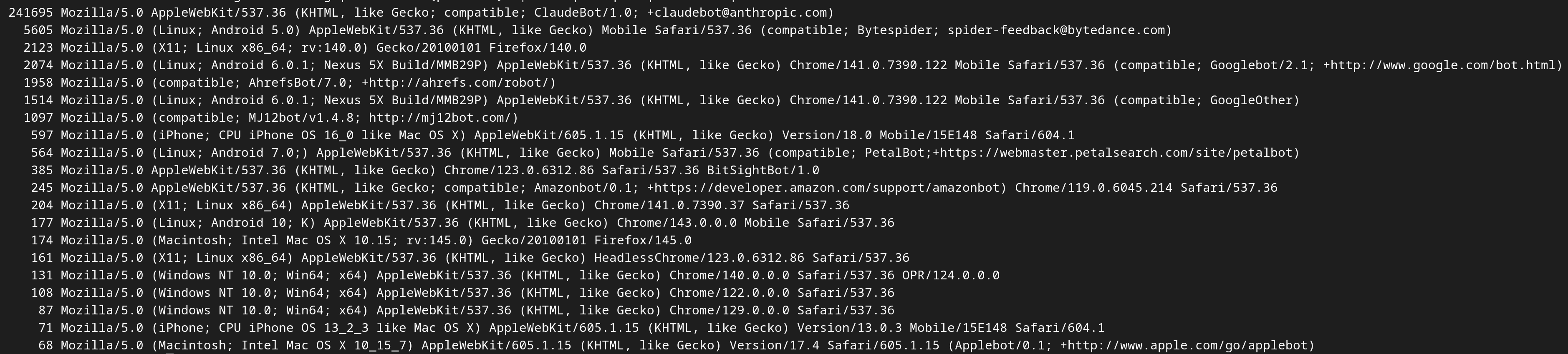
The screenshot below shows an extract of my web server log one month ago: the user agents are ordered by the number of requests they sent to one of my sites during a couple of hours. Your IT team should be able to generate the same kind of output.
You see that ClaudeBot sends over 40’000 times more requests than the second bot (Bytespider) and over 100’000 times more than Googlebot.
To get out of this hell, I edited my .htaccess and added the following lines:
SetEnvIfNoCase User-Agent “ClaudeBot” BadBot
Order Allow,Deny
Deny from env=BadBot
Allow from all
Each request from ClaudeBot gets now a “403 Forbidden” response and my website has regained peace and serenity.
You may find some other examples using different syntaxes, I hope you find a way to identify and solve the problem.
3 Likes
Note that i created a new module Bot Challenge that can fix Claude an other robbers in a simpler way.
Note that there are many improvements too in last versions of AdvancedSearch and Reference that may fix more issues.
Dear @Daniel_KM
Thanks so much for this. We are going to check out the ChallengeBot Module. We are so grateful.
Will also have a look at the updated modules which will work with 4.1.1. I know I had some upgrade issues with References, but will investigate any issues.
Thanks again and I hope to provide updates on BotChallenge in a bit.
Sanjin
Yes, i downgraded the module BotChallenge for Omeka Classic.
To answer your question about why it is your Find page which is most affected, I can provide some insight. Although we do not have an Omeka site live, we suffer the same sort of issues with a Samvera repository. The common factor is that both systems have facet filtering available as plain links which cause a GET request. The crawlers are particularly stupid, and simply try following every link in the page that they can find. So if the bot “clicks on” the topic “Manuscripts” it gets another Find page, with more links, and those links are all different, because although there was a Subject of “African languages” on the previous page, that was to access that facet term in isolation, on the new page the “African languages” link will be combined with the Manuscripts topic. The bot will carry on clicking on every combination of facets possible, causing millions of requests to be sent to your server, even though the actual content you have consists of just 335 records. To add to the combinations, each of your sort options provides a further variation.
Well-behaved bots will check robots.txt. In our repository we have told bots not to follow facet links, as they do not actually given them access to any more content to index or analyse. Instead the bot can use a sitemap of all the resources to find them efficiently. We are trying to help the bots to not waste their time, but there are many idiot arrogant bot operators out there who think that basic rules of the internet do not apply to them in their quest to gain a crushing advantage through artificial intelligence. They ignore robots.txt, which would actually help them spend less time on our site and would save them processing resources, and instead they flood our server and cause it to fail.
As our non-Omeka repository is quite old, we have not been able to install a Javascript challenge yet. We limit the damage to some extent by making multiple facet selections return server errors, as real humans tend to use a search term in combination with multiple facets.
Great, isn’t it?!
2 Likes
Dear @boregar,
Thanks so much for sharing this, and sorry for my long delay in responding. We have had the IT team have a look at this and turns out they have been doing a similar process of finding “bad bots”. Some seem worse than claude as they disguise their identity and shift their IPs constantly. Our .htaccess file got quite complicated so even started looking at software such as failtoban to assist. We are also hoping that the module developed by @Daniel_KM will assist.
Dear @mephillips,
thank you so much for this very detailed explanation. It makes so much sense. it also explains some of the log messages i am getting from the back end around facet search. You articulated this so much and it is very clear about ways we can look into how we can try to get them to behave from our side. Though as you say, it does seem like losing cause.
Really really appreciate it!
Sanjin
We have the same problems with our Drupal sites at Ghent University.
This article provides some useful information about the problem and a solution for Drupal: AI Bot Abuse: Our Evolving Strategy for Taming Performance Nightmares on Drupal Faceted Search Pages | Capellic
The trick is to implement facets as form fields. Bots love links, but they avoid form submits.
@sanjinmuftic, your website renders all facets as links, making them easy targets for bots. In the Advanced Search module, you can change the “input type” of your facets to “Checkbox (default)” and set “Facet mode” to "Send request directly (using checkbox and js). This will mimic the behaviour of a link, but should prevent bots from following your facets.
Best,
Frederic
2 Likes
Dear @flamsens,
Thank you so much. Your post was so incredibly helpful. I instantly went to change the settings on the search pages we have, and we saw a reduction in how many times those were being hit. The article you suggested has also been helpful.
It made me realise also how much I don’t quite understand about how the Advanced Search module works and did not even realise that it had been set up that way. Will have to find more info.
Thanks again, and sorry for delay. Trust me I really followed your advice that very day!
Sanjin
1 Like